Location Mapping
Map your platform's fulfillment locations to Nventory stock locations.
What is Location Mapping?
Platforms like Shopify, BigCommerce, and Square support multiple fulfillment locations (warehouses, stores, distribution centers). Location mapping connects each platform location to a stock location in Nventory so that:
- Inventory levels are tracked per location
- Fulfillments are routed to the correct warehouse
- Stock stays accurate across platforms
How It Works
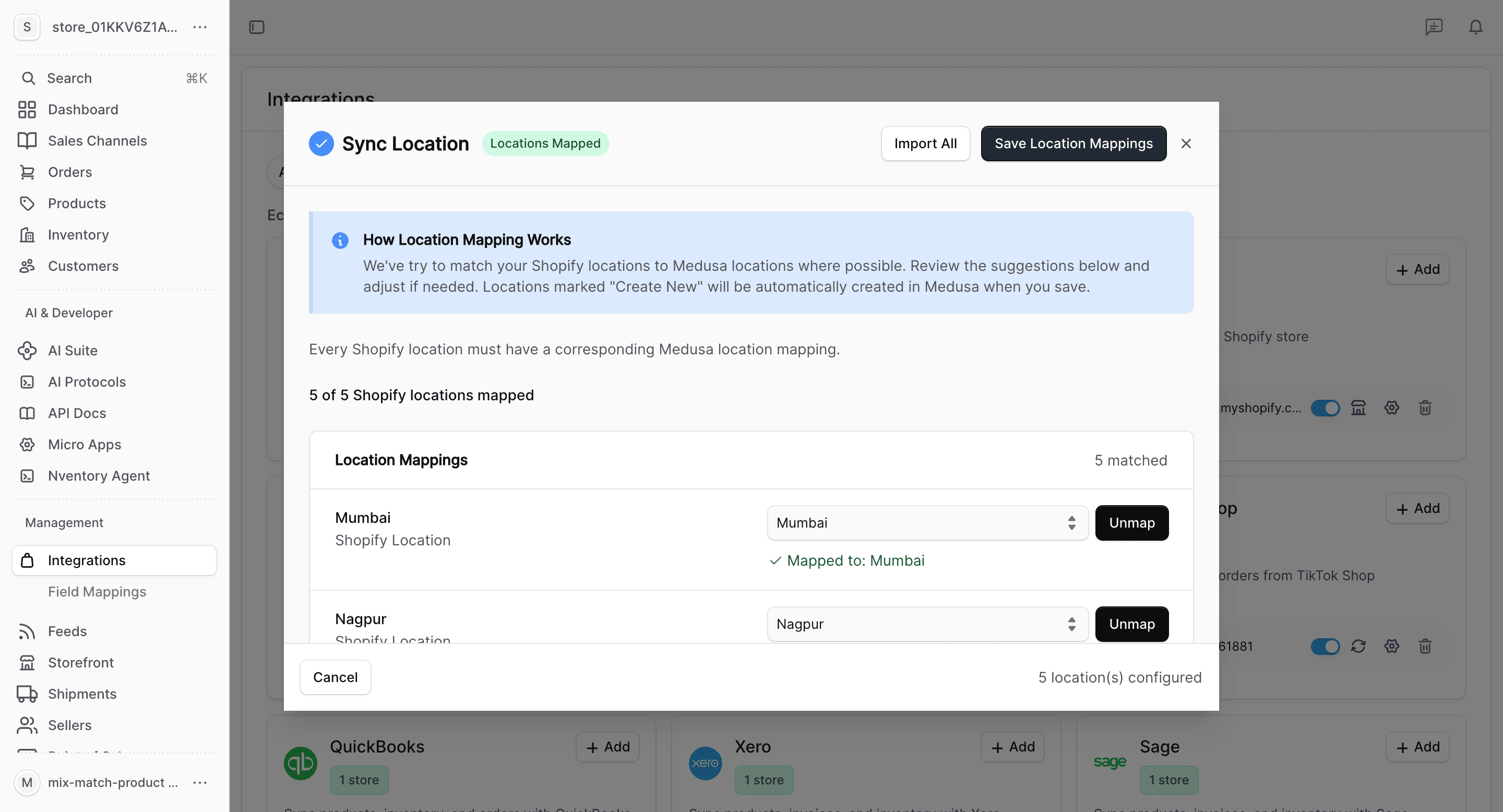
Each platform location is matched to a corresponding Nventory stock location. Nventory auto-suggests matches based on name, city, and country.
Setting Up Location Mappings
Importing Locations from Your Platform
Open Location Settings
Go to Integrations, click on your integration (e.g., Shopify), and navigate to the Locations tab.
Import Locations
Click Import Locations. Nventory fetches all locations from your connected platform and creates matching stock locations automatically.
Each imported location includes:
- Name
- Full address (street, city, state, postal code, country)
Review Mappings
After import, Nventory automatically maps each platform location to its corresponding stock location. Review the mappings to ensure they're correct.
Manual Mapping
If you already have stock locations in Nventory, you can map them manually:
- Go to the Locations tab in your integration settings
- For each platform location, select the matching Nventory stock location from the dropdown
- You can also create a new stock location directly from the mapping screen
- Click Save Mappings
Nventory suggests matches based on location name, city, and country to help you map quickly.
Multi-Location Platforms
These platforms support multi-location mapping:
| Platform | Multi-Location | Import |
|---|---|---|
| Shopify | Yes | Automatic |
| BigCommerce | Yes | Automatic |
| Square | Yes | Automatic |
| eBay | Yes | Automatic |
| WooCommerce | No | Single location |
| Amazon | No | Single location |
How Location Mapping Affects Sync
Inventory
When inventory syncs, stock levels are matched per location. If a product has 50 units in your NYC warehouse on Shopify, that maps to 50 units at the corresponding Nventory stock location.
Fulfillments
When an order is fulfilled on your platform, Nventory uses the location mapping to determine which stock location processed the fulfillment. This keeps your inventory counts accurate across all platforms.
Unmapped Locations
If a fulfillment comes from an unmapped platform location, Nventory falls back to your default stock location. Set up complete mappings to avoid inventory discrepancies.
Always map all active locations on your platform. Unmapped locations can lead to inventory mismatches.